Solution

Communication & Messaging

Send personalized email and SMS to families, staff, and providers — powered by the contact data your forms already collect

Reach Families, Staff, and Providers

Reach Families, Staff, and Providers

Families

Send bulk email and SMS to the parents and guardians of every child in your program. Both parents receive the message. Families with multiple enrolled children get one message — not a separate notification for each sibling.

Admins, Teachers & Staff

Notify your internal team with the same ease. Select all admins, all teachers, all staff — or any combination. When you’re closing early for snow, your staff hears about it the same way parents do.

Providers & Centers

In Coordinated Enrollment programs, send templated messages directly to the provider organizations and centers in your network. Keep every partner informed without leaving the platform.

Select. Personalize. Send.

Select. Personalize. Send.

Step 1: Select Your Audience
Choose an entire program, a specific group, or individual children. Filter by enrollment status so only the right families receive your message. Active summer camp enrollees get the field trip update — fall registrants don’t.
Step 2: Pick a Template
Step 3: Send via Email, SMS, or Both

Why Send Messages from Within UpBup?

Why Send Messages from Within UpBup?

Your Compliance Data Is Your Contact List

Parents provide their email and phone number on required compliance forms — the same health, emergency, and enrollment forms you need on file for licensing. Messages are always delivered using the latest email addresses and mobile phone numbers already on file. No separate contact list to maintain. No CSV imports. No outdated spreadsheets.


Hundreds of tools can send messages. The hard part isn’t the sending — it’s keeping the contact list accurate. UpBup solves that by making compliance and communication share the same data.

Parents provide their email and phone number on required compliance forms — the same health, emergency, and enrollment forms you need on file for licensing. Messages are always delivered using the latest email addresses and mobile phone numbers already on file. No separate contact list to maintain. No CSV imports. No outdated spreadsheets.


Hundreds of tools can send messages. The hard part isn’t the sending — it’s keeping the contact list accurate. UpBup solves that by making compliance and communication share the same data.

Parents provide their email and phone number on required compliance forms — the same health, emergency, and enrollment forms you need on file for licensing. Messages are always delivered using the latest email addresses and mobile phone numbers already on file. No separate contact list to maintain. No CSV imports. No outdated spreadsheets.


Hundreds of tools can send messages. The hard part isn’t the sending — it’s keeping the contact list accurate. UpBup solves that by making compliance and communication share the same data.

Status-Aware Delivery

Every child in UpBup has an enrollment status — whether they’re currently attending, starting soon, on a waitlist, or no longer enrolled. When you send a message, you choose which families receive it based on their status. Reach everyone, or narrow it to just the families currently attending — so a family that doesn’t start for another six weeks won’t get today’s closure notice unless you want them to. Standalone messaging tools can’t do this because they don’t know enrollment status.

Message Templates — Simple, Reusable, Personalized
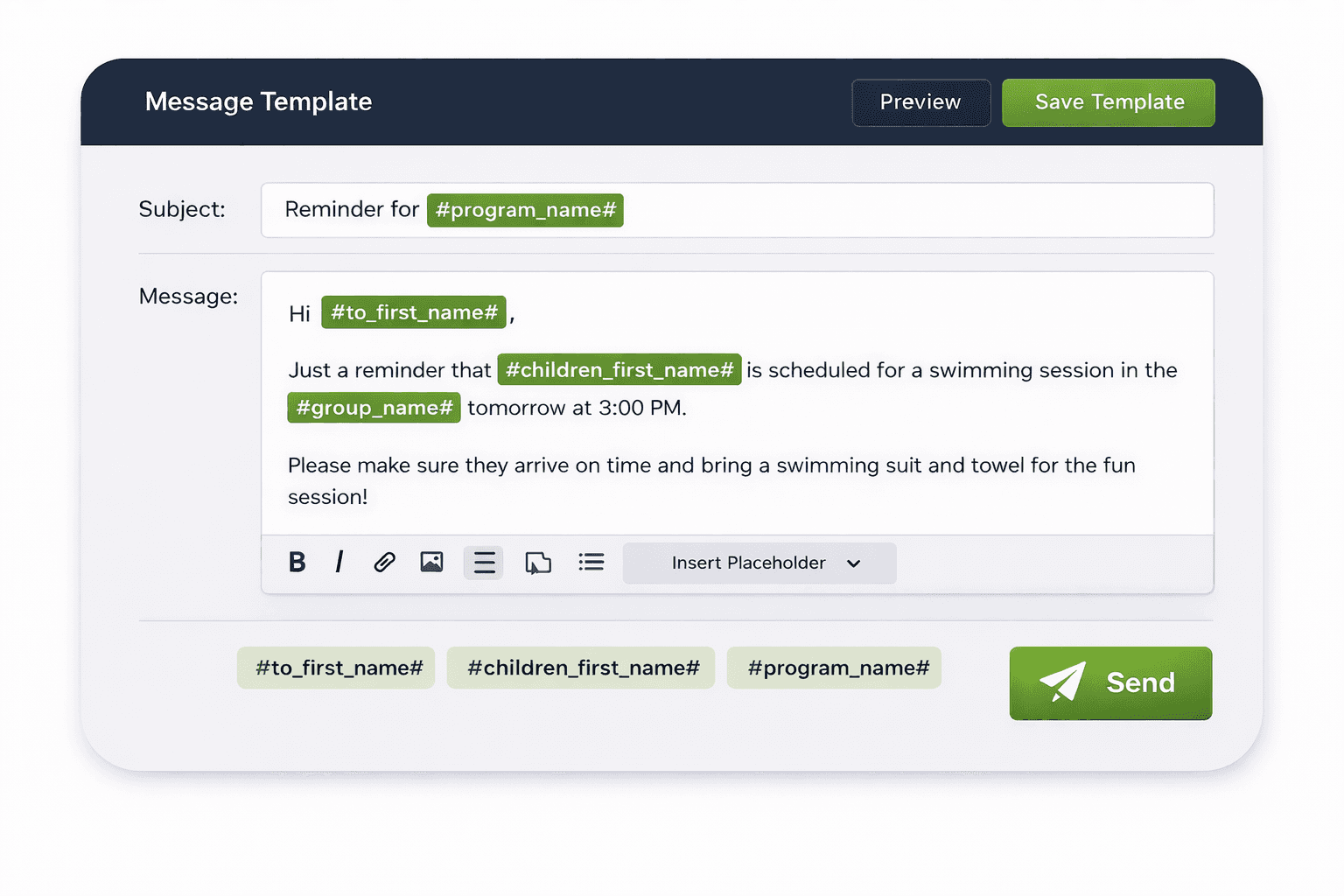
A message template is a reusable message you write once. Instead of writing hundreds of individual emails, you create one template — and when it’s sent, each parent sees their child’s name and relevant details filled in automatically. Three hundred families each get a message that looks like it was written just for them.


Your directors are already emailing families. But can those emails include each child’s name in the subject line? Can they address each parent personally? Can another admin see what was sent? With most email tools, the answer is no. UpBup’s message templates solve that.

A message template is a reusable message you write once. Instead of writing hundreds of individual emails, you create one template — and when it’s sent, each parent sees their child’s name and relevant details filled in automatically. Three hundred families each get a message that looks like it was written just for them.


Your directors are already emailing families. But can those emails include each child’s name in the subject line? Can they address each parent personally? Can another admin see what was sent? With most email tools, the answer is no. UpBup’s message templates solve that.

A message template is a reusable message you write once. Instead of writing hundreds of individual emails, you create one template — and when it’s sent, each parent sees their child’s name and relevant details filled in automatically. Three hundred families each get a message that looks like it was written just for them.


Your directors are already emailing families. But can those emails include each child’s name in the subject line? Can they address each parent personally? Can another admin see what was sent? With most email tools, the answer is no. UpBup’s message templates solve that.

Template governance

Template governance

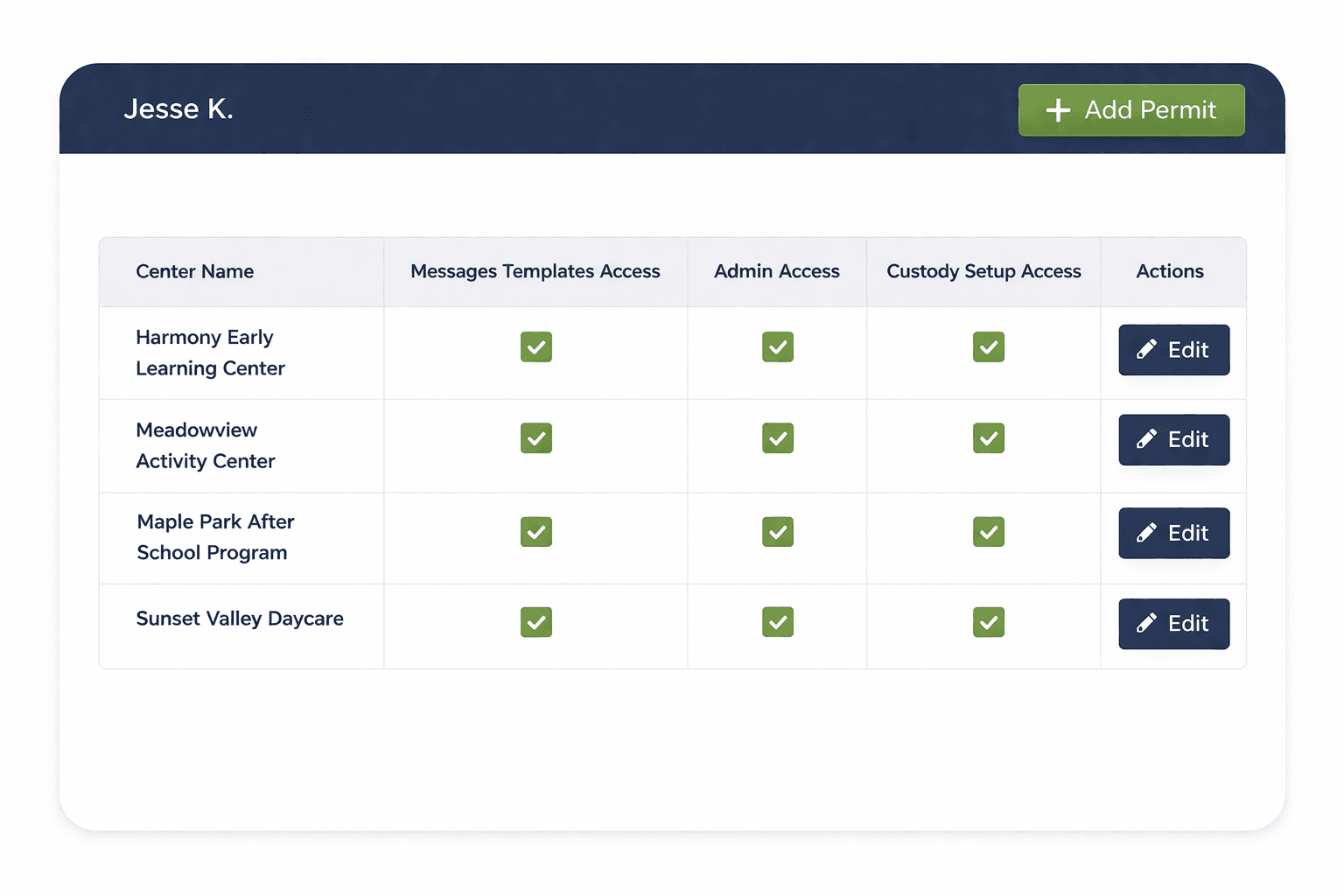
Control which admins can create and edit templates at each site through UpBup’s permits system. An admin might have permission to send messages at five sites but only edit templates at two. This prevents accidental changes to shared templates while keeping your messaging workflow flexible across a large team.
Email and SMS, Purpose-Built for Programs

Email and SMS, Purpose-Built for Programs

Email

Text Messages

Included with your UpBup plan

Available as an add-on

Sent from your own email address — parents can reply directly to you

One-way delivery for time-sensitive alerts

Supports Info and Emergency message types

Supports Info and Emergency message types

Unlimited messages

Priced per program

Full template and placeholder support

Full template and placeholder support

Email is sent from your organization’s own address — not a generic no-reply. Parents see a familiar sender and can reply directly. SMS is purpose-built for urgent, time-sensitive communication.
Dashboard
Dashboard

See What’s Been Sent Across Your Team

See What’s Been Sent Across Your Team

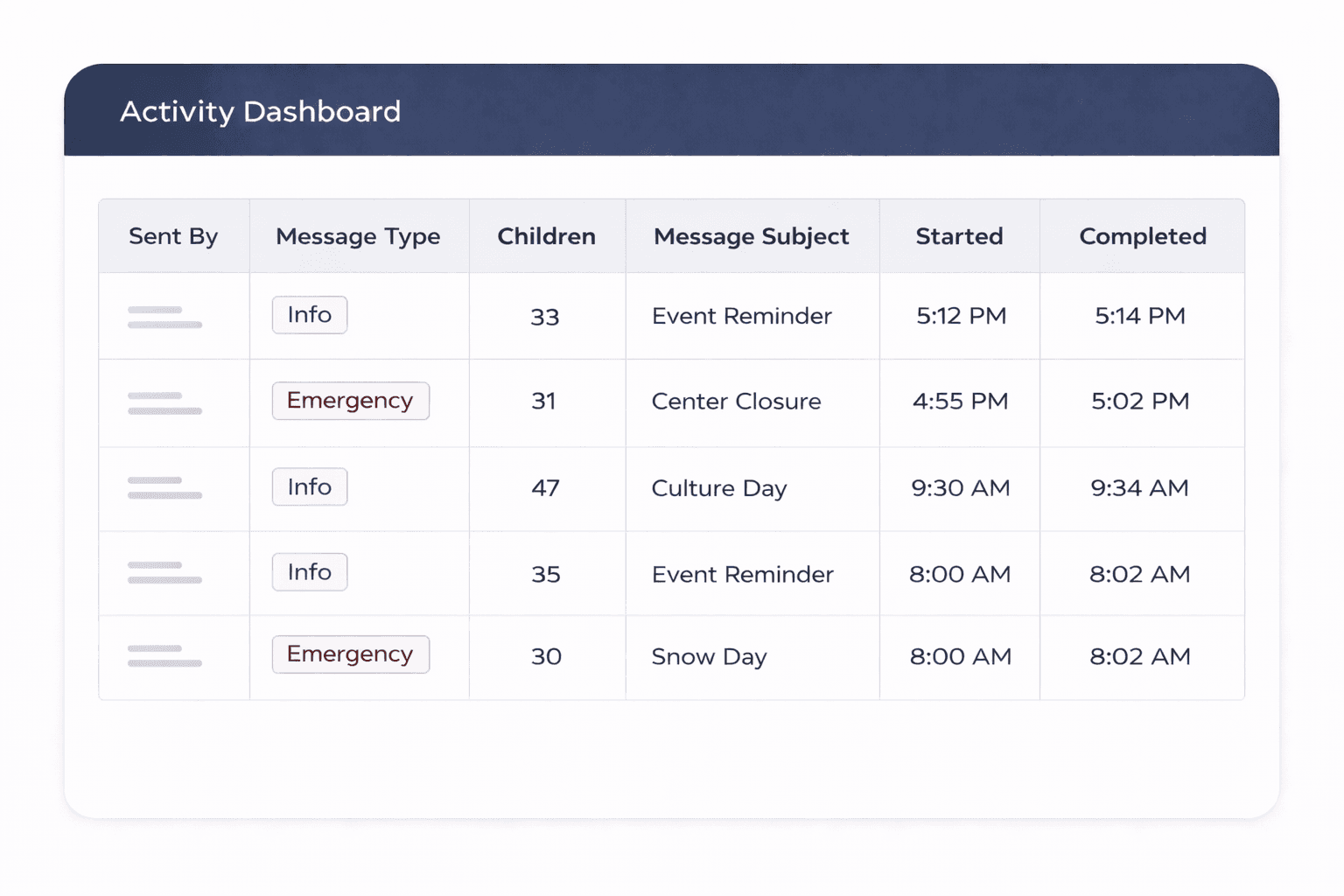
When dozens of admins are sending messages across multiple sites, coordination matters. The Activity Dashboard shows a centralized log of every message sent — who sent it, which template, how many recipients, and exactly when it was delivered.

Filter by admin name or message type. See at a glance what’s gone out in the last several weeks.

Stay fully aligned — even when team members change — so nothing gets duplicated or missed.


In networks with high turnover and dozens of admins across multiple sites, no single person has the full picture. When a director leaves or someone new steps in, the Activity Dashboard tells them exactly what’s already been communicated.

When dozens of admins are sending messages across multiple sites, coordination matters. The Activity Dashboard shows a centralized log of every message sent — who sent it, which template, how many recipients, and exactly when it was delivered.

Filter by admin name or message type. See at a glance what’s gone out in the last several weeks.

Stay fully aligned — even when team members change — so nothing gets duplicated or missed.


In networks with high turnover and dozens of admins across multiple sites, no single person has the full picture. When a director leaves or someone new steps in, the Activity Dashboard tells them exactly what’s already been communicated.

When dozens of admins are sending messages across multiple sites, coordination matters. The Activity Dashboard shows a centralized log of every message sent — who sent it, which template, how many recipients, and exactly when it was delivered.

Filter by admin name or message type. See at a glance what’s gone out in the last several weeks.

Stay fully aligned — even when team members change — so nothing gets duplicated or missed.


In networks with high turnover and dozens of admins across multiple sites, no single person has the full picture. When a director leaves or someone new steps in, the Activity Dashboard tells them exactly what’s already been communicated.

Granular Control Across Every Site

Granular Control Across Every Site

UpBup’s permits system gives you precise control over who can do what at each site. An admin can send messages at five locations but only edit templates at two. A teacher sees a read-only classroom view and receives messages — but can’t send them. Staff members see only their own forms and receive messages.

Role

Role

Can Send Messages

Can Edit Templates

Can Edit Templates

Provider Admin

Yes — controlled per site via permits

Yes — controlled per site via permits

Teacher

No — read-only classroom view

No

Staff

No — sees own forms only

No

Your Team Is Already Emailing Families. Here’s What’s Missing.

Your Team Is Already Emailing Families. Here’s What’s Missing.

Most programs already communicate with families by email. The question isn’t whether you can send a message — it’s whether those messages are personalized with each child’s name, whether both parents receive them, whether your team can see what’s already been sent, and whether inactive families are still on the list.

Many standard email tools limit you to 500 recipients per message. A program with 700 children and two parents each means 1,400 emails — that can’t be done in a single send. And even when it works, there’s no personalization, no status filtering, no activity log, and no way for another admin to see what was communicated.

UpBup handles all of that with enterprise-grade email and SMS delivery built right into the platform. One bulk request. Every message personalized. Every send logged and visible to your team.

Built for Networks, Not Just One Center

Built for Networks, Not Just One Center

Capability

UpBup

Point Solutions

Contact data from compliance forms

Automatic

Separate list

Status-aware delivery (Active, Inactive, Enrolling, Waitlisted)

Built in

Not available

Bulk personalized messages to hundreds of families

Select all + template

Manual or limited

Email + SMS from one place

Both channels

Varies

Staff and admin messaging

Three distinct recipient groups

Family messaging only

Provider/center messaging (coordinated enrollment)

Included

Not available

Sibling deduplication

One message per family

Duplicate messages

Dual-parent delivery

Both guardians

Varies

Multi-admin activity dashboard

Centralized log

No visibility

Template governance per site

Permits system

All or nothing

Sent from your own email address

Your domain

Generic sender

Discover more

Communication That Keeps Up with Your Network

Communication That Keeps Up with Your Network

Communication That Keeps Up with Your Network

See how UpBup’s built-in messaging helps multi-site programs reach every family, staff member, and provider — with contact data that’s always current and delivery that respects enrollment status.